

 LinkedIn
A ChatGPT screenshot proves that ChatGPT produced an answer once. It does not prove which of your client’s pages a crawler fetched to produce it.
I would rather start with the server-edge log: the requested URL, the response, and whether the supposed AI crawler was verified. That evidence is harder to decorate for a deck, which is precisely why it is useful. This tutorial builds a repeatable way to collect it across client domains without waiting for each client’s development team.
What you will have at the end
You will have an edge-level request log and a 30-day, page-level rollup of verified AI crawler fetches. The report will distinguish background crawls from requests made by user-facing agents, and keep unverified bot claims out of the headline numbers.
A verified fetch tells you an agent requested a page. It does not, by itself, prove that the page appeared in a live answer or earned a citation. Keep that distinction intact when the report reaches a client.
Before you start: get DNS, edge, and log access
You need control of the client domain’s DNS, access to the edge proxy account, and a destination where you can query its HTTP request logs. The workflow below uses Cloudflare paths and fields as examples. Confirm that the client’s account exposes the logging and verified-bot fields you plan to use before changing nameservers.
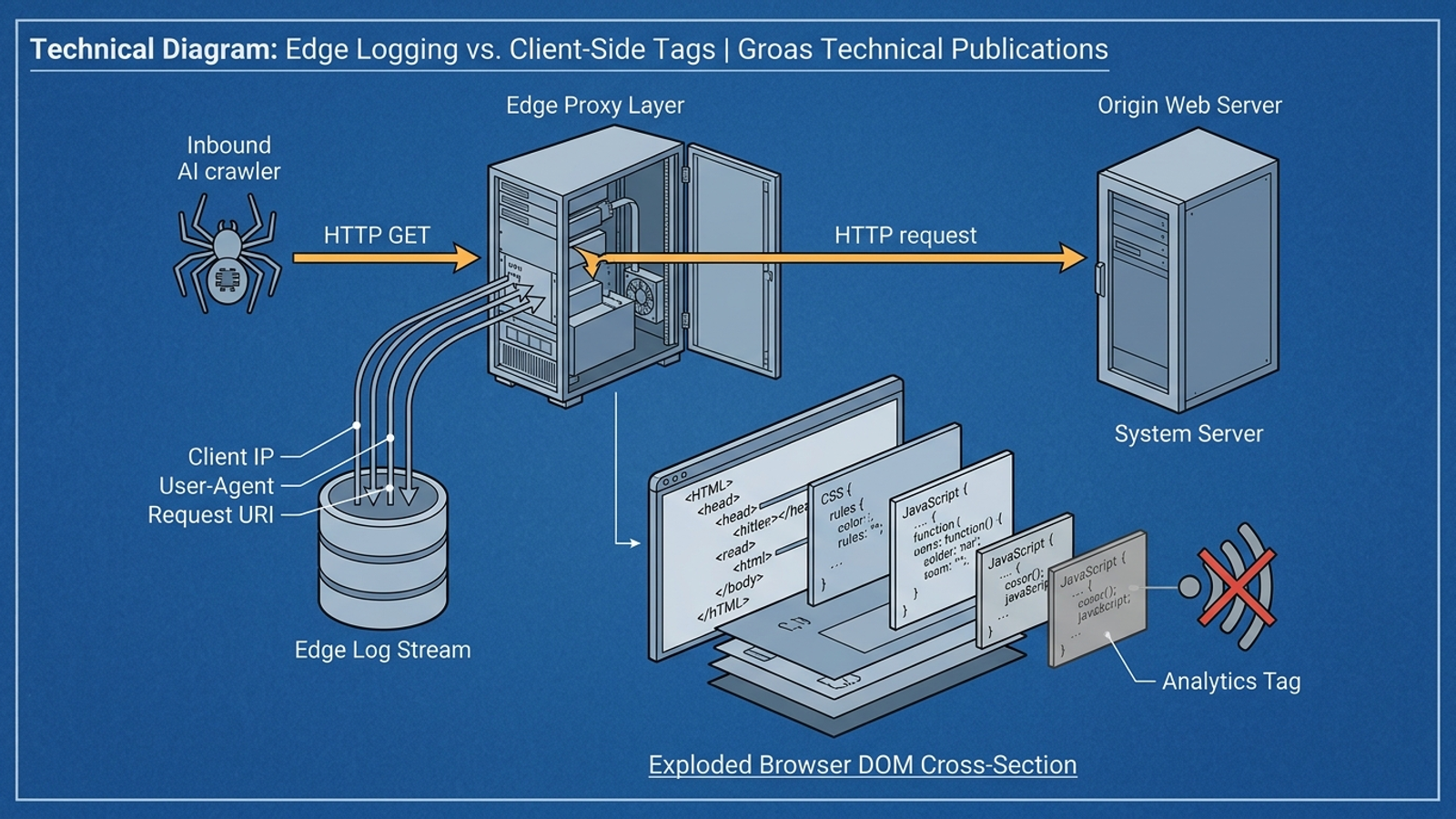
You do not need to install a CMS plugin or change backend application code. You do need somewhere to send and query the records; DNS access alone will not produce a report. An edge proxy captures structured HTTP request data before the request reaches WordPress, Webflow, or Shopify.
Client-side analytics such as GA4 measure browser activity. AI crawlers generally request pages without firing the browser-based analytics tags you rely on for human visits, a gap also discussed in community crawl analyses. Edge logs show the incoming request, including its URL, IP, headers, and response status. That makes them the right starting point for this job. Do not use a zero in GA4 as a zero in crawler activity.
Step 1: Route one pilot domain through the edge
Start with one client. A working pilot is worth more than 15 domains with broken redirects.
- In Cloudflare, select Websites > Add a Site, enter the client’s domain, and review the imported DNS records against the existing records.
- Under SSL/TLS > Overview, set the encryption mode to Full (Strict) if the origin is configured for it. Check the origin certificate and HTTPS behavior before switching live traffic.
- At the domain registrar, replace the authoritative nameservers with the nameservers assigned to that site in Cloudflare.
- Under DNS > Records, find the apex
Arecord and thewwwCNAMErecord. Set Proxy status to Proxied for the hostnames you intend to log. - Once DNS changes have propagated, check the response headers:
curl -I https://clientdomain.com | grep -i 'cf-ray'
Expected result: A CF-RAY header appears, showing that the request passed through Cloudflare. Check the full response separately to confirm the page serves the intended content; the header alone does not promise a 200 OK.
Common mistake: Turning on the proxy while SSL/TLS > Overview is set to Flexible and the origin redirects HTTP to HTTPS. That combination can create a redirect loop. Resolve the origin’s HTTPS setup first, then switch traffic. A telemetry project should not be the reason a client’s site stops loading.
Step 2: Capture the AI agent strings you care about
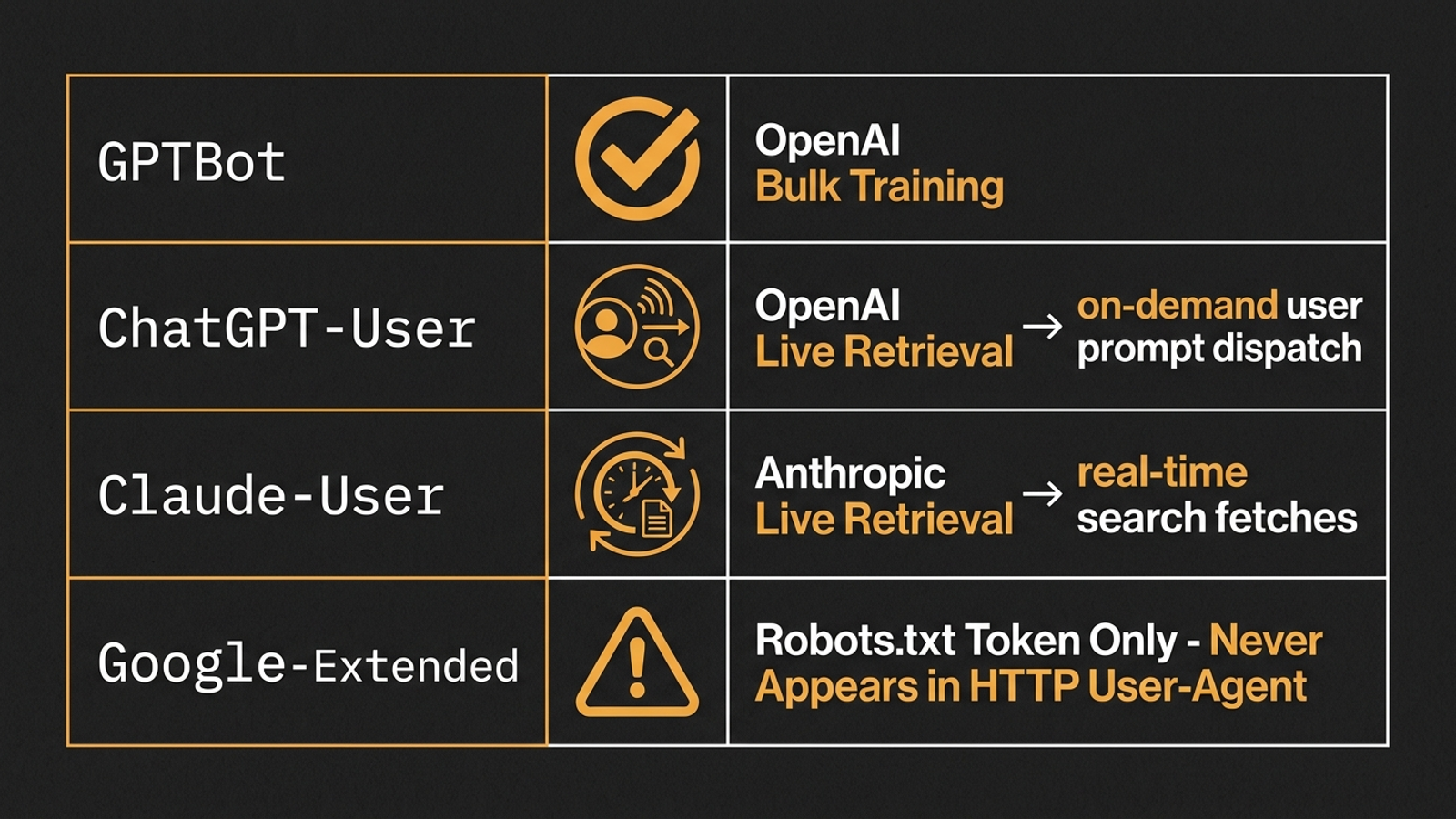
Filter incoming requests by the agent names, but treat this as a candidate list, not verification. The names indicate what a requester claims to be.
- OpenAI: Its bot documentation distinguishes
GPTBotfromChatGPT-User. - Anthropic: Its crawler guidelines list
ClaudeBot,Claude-SearchBot, andClaude-User. - Perplexity: Include
PerplexityBot, but do not infer a specific live user prompt from that string alone.
Use this expression in the User-Agent filter for your log pipeline:
(GPTBot|ChatGPT-User|ClaudeBot|Claude-SearchBot|Claude-User|PerplexityBot)
Expected result: Requests claiming one of those agent identities enter your AI-crawler dataset, along with the requested path, response status, client IP, timestamp, and available verification field.
Common mistake: Adding Google-Extended to the User-Agent expression. Google’s crawler documentation describes it as a robots.txt control token, not an HTTP User-Agent. It will not produce the matches you expect.
Step 3: Verify the requester before counting its hits
Any script can send a header that says GPTBot. That is why a User-Agent match belongs in a holding area, not in a client-facing total. Crawler research from Human Security documents bot impersonation; in our analysis of edge telemetry, 76.5% of claimed AI bot hits failed verification. Report those requests as verified interest and your deck may be celebrating vulnerability scans.
In the edge logging configuration, include the available verified-bot field alongside the User-Agent and request fields. Depending on the Cloudflare setup, the relevant field may be cf.bot_management.verified_bot or cf.client.bot. Check the field names and values in the records your account actually exports; the query in Step 5 assumes you map the result to verified_bot.
Cloudflare’s verified-bot documentation describes its verification methods, including DNS checks and published IP information. Keep both verified and unverified candidate requests in storage so you can count spoof attempts, but exclude unverified requests from crawler-activity totals.
Expected result: Each candidate request has a verification value you can use in a query. A matching User-Agent with verified_bot = false does not enter your verified training or live-fetch counts.
Common mistake: Dropping unverified rows before storage and then trying to report how many you discarded. Retain them for the spoof column; just do not present them as AI engine activity.
Step 4: Label the type of request without claiming a citation
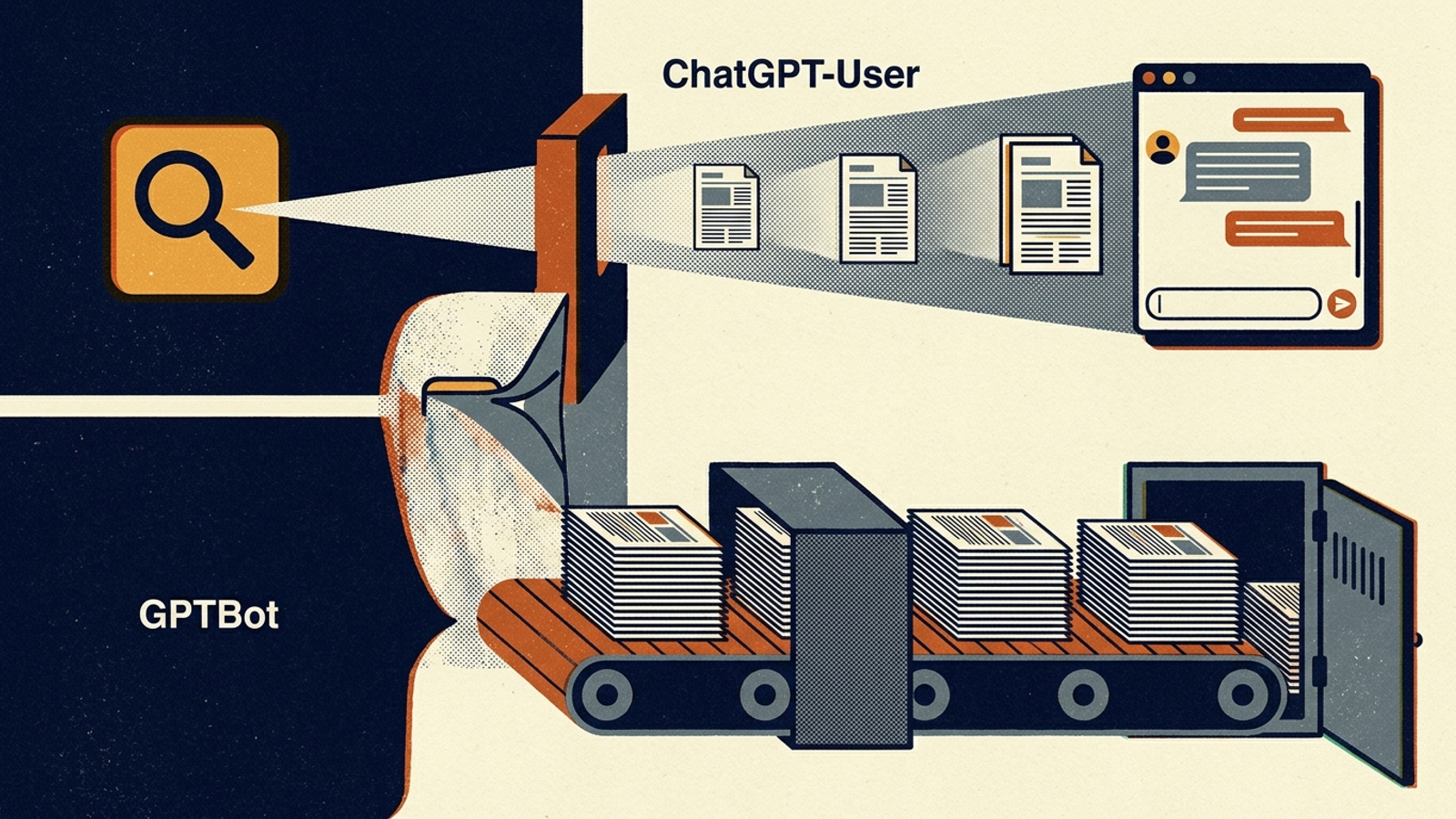
A bulk crawl and a user-facing retrieval should not share one impressive-looking total. GPTBot and ClaudeBot belong in the background-crawl bucket. ChatGPT-User and Claude-User belong in the user-facing fetch bucket. Claude-SearchBot and PerplexityBot get separate search buckets here because their agent strings alone do not establish that a particular request fed a live answer.
Our 30-day audit of 11,793 AI bot hits on our homepage is a useful reminder of why gross volume is a poor substitute for this split. The page requested matters as much as the count.
In your log-processing transform, apply this classification to the recorded userAgent, then write the resulting value as bot_intent:
let botIntent = 'unknown';

if (userAgent.includes('ChatGPT-User') || userAgent.includes('Claude-User')) {
  botIntent = 'live_answer';
} else if (userAgent.includes('GPTBot') || userAgent.includes('ClaudeBot')) {
  botIntent = 'training_crawl';
} else if (userAgent.includes('Claude-SearchBot') || userAgent.includes('PerplexityBot')) {
  botIntent = 'search_index';
}
Use live_answer as a reporting label for a user-facing agent fetch, not a claim that you saw the finished answer. Apply the tag to candidate requests, then use the verification field when you count them.
Expected result: The logged AI-agent requests carry a bot_intent value of live_answer, training_crawl, search_index, or unknown.
Common mistake: Showing a client 4,000 GPTBot requests to old blog posts as proof that active buyers are finding the current offer. Those requests establish a different, narrower thing: the pages were fetched by a training crawler.
Step 5: Build the 30-day page rollup
Send the request records to the destination you chose before the DNS switch, such as a queryable warehouse fed by Logpush. Map its exported field names to the names below: ClientRequestURI, EdgeStartTimestamp, verified_bot, bot_intent, bot_family, and is_ai_crawler. Do not paste a sample query into an unmapped schema and call the resulting error a crawler problem.
Run this query against the mapped table:
SELECT
  ClientRequestURI AS page_path,
  COUNTIF(bot_intent = 'training_crawl' AND verified_bot = true) AS verified_training_hits,
  COUNTIF(bot_intent = 'live_answer' AND verified_bot = true) AS verified_live_hits,
  COUNTIF(bot_intent = 'search_index' AND verified_bot = true) AS verified_search_hits,
  COUNTIF(verified_bot = false) AS spoofed_unverified_hits,
  ARRAY_AGG(DISTINCT bot_family) AS active_bots
FROM `edge_logs.client_http_requests`
WHERE EdgeStartTimestamp >= TIMESTAMP_SUB(CURRENT_TIMESTAMP(), INTERVAL 30 DAY)
  AND is_ai_crawler = true
GROUP BY 1
ORDER BY verified_live_hits DESC, verified_training_hits DESC;
Expected result: One row per requested URI, with verified request counts split by category and a separate count of unverified claims. The first month’s report will cover only the days since logging began, even though the query asks for a trailing 30 days.
Common mistake: Presenting /robots.txt, .ico files, and .png files beside pricing and comparison pages as though all requests were content evaluation. Keep the raw rows, but filter system files and assets from the client-facing content view. Review the homepage separately, too: its traffic can bury the interior pages you are trying to inspect.
Step 6: Turn requests into an honest client report
Put verified interior-page fetches first. Show the page, the agent category, and the response the agent received. Put unverified claims in their own column so the client can see why the gross number is not the headline.
Here is an illustrative layout, not a set of client results:
| Client page path | Verified training hits | Verified user-facing hits | Unverified claims discarded | What to inspect |
|---|---|---|---|---|
/pricing | 148 | 39 | 312 | Response and current pricing content |
/vs-competitor | 94 | 52 | 140 | Comparison content and response |
/integrations | 61 | 14 | 88 | Feature detail and response |
/blog/legacy-post | 1,240 | 0 | 510 | Background crawl only |
Expected result: A client can tell which pages verified agents requested and which requests were merely claims made in a header. A 200 OK user-facing fetch is stronger evidence of access than a screenshot. It is still not proof of a citation, a buyer, or revenue.
Common mistake: Treating zero hits as proof that a model never mentions the client. A model may answer without a fresh request to that page. Treat zero-hit pages as an audit list, not a verdict; check whether the important content is accessible and whether the response is the one you intended.
Step 7: Repeat the pilot across client domains

Once the pilot produces trustworthy rows, repeat the same sequence for domains 2 through 15:
- Route the domain: Review its imported DNS records, confirm HTTPS behavior, then switch the intended hostnames to Proxied.
- Apply the same classification: Reuse the User-Agent filter and
bot_intentmapping. Confirm the verification field is available on that account rather than assuming the pilot’s schema carries over. - Separate client data: Send the domain’s records to the log destination and tag them with its
domain_idso one client’s hits do not appear in another’s report. - Run the first-day check: Within 24 hours, query for incoming request rows, their verification values, and their response statuses. Do not expect a verified AI fetch on demand; confirm logging works before waiting for one.
Expected result: Each domain has its own queryable request history and the same report definitions. The repeatable part is the edge configuration and reporting workflow, not a promise that every client will receive crawler traffic on your schedule.
Common mistake: Scaling a pilot whose 200 OK pages are actually redirects or challenge screens for crawlers. Check the response before you copy the setup 14 times.
For a roster of clients, manual log maintenance can become its own agency service disguised as a measurement project. If the next job is acting on what you learn across paid and organic search, groas for agencies offers autonomous execution with human strategic ownership. Do not confuse that work with the edge report you just built: a request log measures access, while search performance still has to earn its result.
To verify this pipeline, find a verified ChatGPT-User or Claude-User request for an interior URL, confirm the domain and path, and inspect its HTTP response. First change once it works: fix any redirect or challenge that prevents that agent from receiving the intended page. Then read the 30-day rollup. The screenshot can wait.