

 LinkedIn
Your Google Ads account already holds a list of buyer questions worth testing in AI search: the search terms that converted. Before paying for an answer-engine visibility platform, I would turn those terms into prompts, run them through ChatGPT, Perplexity, and Google, and see where competitors get cited while you do not.
A converting search term is more useful for this job than a keyword you found because its estimated volume looked attractive. Someone typed it, clicked, and took an action you track. The same buyer may ask an answer engine a longer, more specific version of that question. This build connects the two without pretending one screenshot is a visibility strategy.
What you will build, and what you need
The finished workbook is a ranked list of commercial content gaps, not a generic keyword calendar. It will contain a raw Google Ads export, 30 to 50 buyer-intent clusters with conversational prompts, a three-engine audit, and a score that puts conversion value beside missing citations and competitor appearances.
Before starting, have:
- Read or export access to a Google Ads account with at least 90 days of active conversion tracking.
- A blank Google Sheet or Microsoft Excel workbook.
- Browser access to Google Ads, ChatGPT, Perplexity, and Google Search.
You will run each prompt three times in each engine: nine observations per prompt. That is manual work. The point is to learn which pages deserve it before buying another dashboard.
Step 1: Export search terms that converted
In Google Ads, open Campaigns > Insights and reports > Search terms. Set the range to Last 90 days. For a long sales cycle or lean high-ticket B2B volume, use Last 180 days. Select Add filter > Conversions, set it to >= 1, and apply it.
Under Columns > Modify columns, keep these six fields:
Search termMatch typeKeywordCampaignConversionsConv. value
If you do not track variable revenue or offline lead value, use a consistent assigned value for each conversion, such as the draft working example of $250. Click the Download icon and choose Google Sheets or CSV. Put the export in a tab named 01_Raw_Export, with those six fields in columns A through F. Leave column G for the cluster labels you will assign next.
Expected result: A raw list of converting queries. Depending on account size, that might be 60 rows or 500; the build does not depend on hitting an arbitrary row count.
Mistake to avoid: Exporting every query, then letting low-intent traffic dominate the exercise. The search terms report also hides some queries in Other search terms, so treat this as a useful observed list, not a complete record of every buyer question. Google Ads privacy thresholds limit what appears in the report.
Step 2: Group queries by the decision a buyer is making
Create 02_Intent_Clusters. In row 1, enter these headers in this order: Intent Cluster, Consolidated Query Count, Total Conversions, Total Conversion Value, Current Landing Page, URL Citation Rate, Competitor Appearances, Brand Mention Rate, Synthetic Buyer Prompt, and AI Opportunity Score.
Return to 01_Raw_Export and sort by Conv. value, highest first; use Conversions if value is not meaningful in your account. In column G, label each term by the buyer requirement it expresses, not merely its shared words. For example, b2b warehouse management software, best wms software for 3pl, and top warehouse management systems mid market can sit under Mid-Market 3PL WMS if they point to the same decision.
Enter each distinct label once in column A of 02_Intent_Clusters. Use the following formulas in B2, C2, and D2, respectively, then fill them down:
=COUNTIF('01_Raw_Export'!G:G,A2)
=SUMIFS('01_Raw_Export'!E:E,'01_Raw_Export'!G:G,A2)
=SUMIFS('01_Raw_Export'!F:F,'01_Raw_Export'!G:G,A2)
In column E, enter the page your ads currently send that intent to. Check the relevant campaign or ad destination as you do this; the six-column search terms export does not contain the landing-page URL.
Expected result: A compact set of buyer intents weighted by the conversions and conversion value in your export. Aim for 30 to 50 clusters if your account supports them, but do not manufacture distinctions to reach that number.
Mistake to avoid: Treating payroll software pricing and payroll software compliance features as one intent because both contain “payroll software.” One buyer is working through cost; the other is working through risk. Merge them, and the prompt you test will answer neither question well.
Step 3: Rewrite each intent as a buyer prompt
A paid search query is not an answer-engine prompt. Paste commercial roof repair quote into ChatGPT and you have not asked it to compare providers, prices, or service constraints. Give it the decision the buyer is actually trying to make.
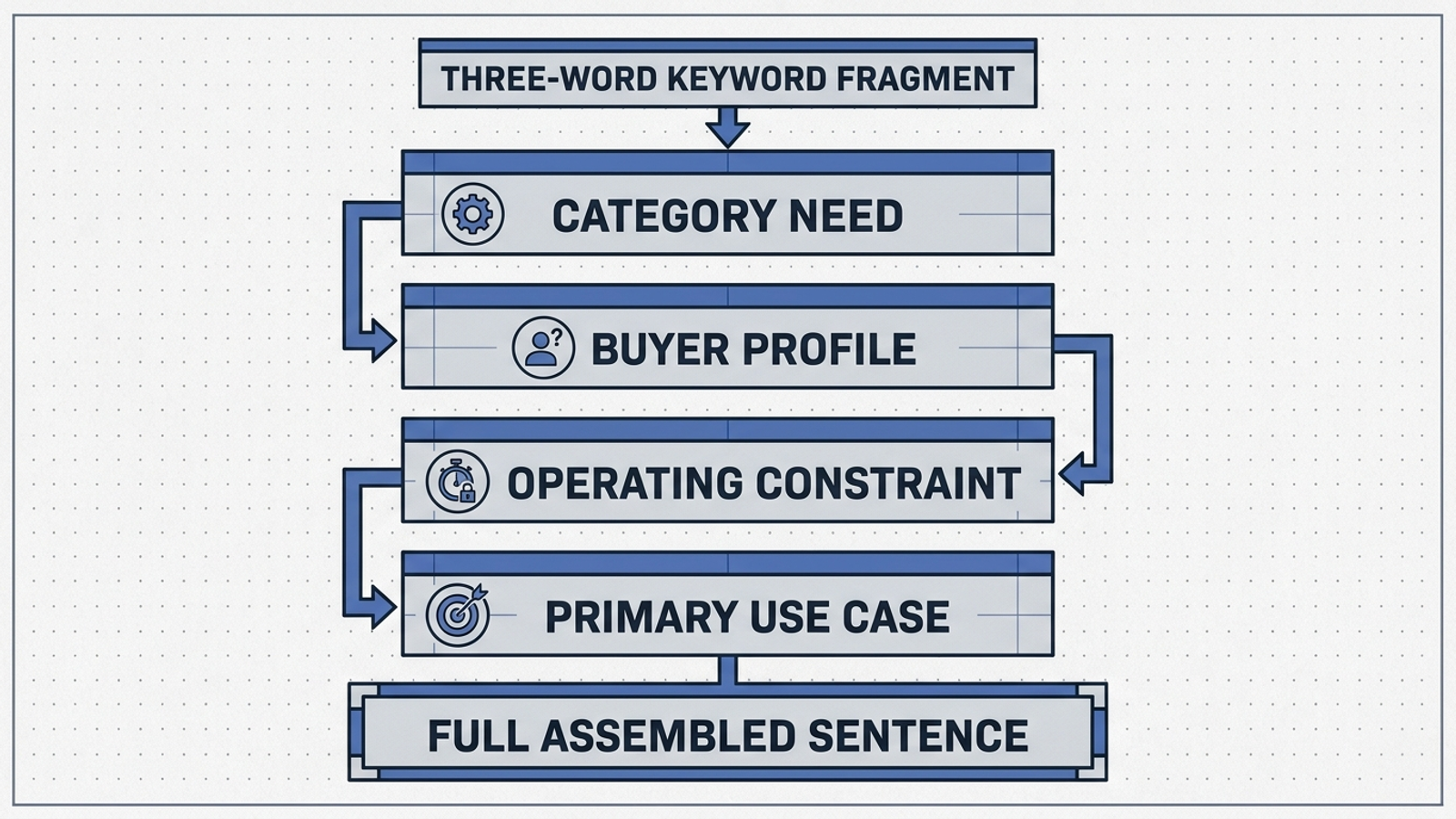
In column I of 02_Intent_Clusters, write one prompt per cluster using this four-part structure:
[Category need] + [Buyer profile] + [Operating constraint] + [Primary use case]
Here are three rewrites. They are examples to adapt, not details to copy into unrelated markets:
hipaa compliant cloud storage pricing→We are a 45-person medical billing firm migrating patient archives off legacy servers. Which HIPAA-compliant cloud storage providers offer per-seat transparent pricing under $30/month with signed BAA support?emergency industrial boiler rental→Our food processing facility in Ohio suffered a primary steam boiler failure. What mobile industrial boiler rental companies offer 24/7 delivery within 150 miles and provide temporary hookup technicians?b2b wholesale order management shopify→We do $8M in annual apparel sales and need an order management platform that integrates with Shopify Plus to support tiered wholesale volume pricing and net-30 terms. What solutions should we evaluate?
The exact wording matters because it sets the comparison. For more category, alternative, and trust-intent patterns, use our buyer-question reference guide. Keep the constraints faithful to the cluster you are testing.
Expected result: One usable, conversational buyer prompt for each intent cluster. A reader should be able to tell what the buyer needs and what would rule a provider in or out.
Mistake to avoid: Putting your brand in the prompt. “Is [MyBrand] the best warehouse management system for mid-market 3PLs?” tests whether the engine can answer a question about you. It does not test spontaneous inclusion when a buyer asks for options.
Step 4: Run three checks per engine and log the answers
Create 03_Multi_Engine_Audit. Enter these headers across row 1: Intent Cluster, Engine, Run Index, Brand Mentioned, URL Cited, Landing Page Cited, Competitors Recommended, and Competitor Count.
For each prompt, run three separate checks in ChatGPT Search with web search active, three in Perplexity, and three in Google Search. Log a Google AI Overview observation only when an AI Overview appears for the query; if none appears, note that in the audit rather than recording it as an answer that omitted you. Keep the prompt wording identical across runs. Use a clean browser session, turn ChatGPT memory Off, and keep your test location aligned with the buyer market as far as the available settings allow.
Record 1 in Brand Mentioned when the answer names your company, and 0 when it does not. Record 1 in URL Cited only when the answer links to your domain, and put the linked URL in Landing Page Cited. A name-drop is not a citation. In Competitors Recommended, separate named rivals with semicolons; enter their number in Competitor Count. Do not count a rival twice in one answer because it appears twice in the prose.

Expected result: Up to nine logged observations per prompt: 270 to 450 rows for a 30-to-50-prompt panel when all three engines return the answer format being tested. The repeated runs help you avoid building an editorial plan around a single variable answer. For a longer-running panel, see our guide to measuring AI search visibility.
Return to 02_Intent_Clusters. Put these formulas in F2, G2, and H2, respectively, then fill down:
=IFERROR(AVERAGEIFS('03_Multi_Engine_Audit'!E:E,'03_Multi_Engine_Audit'!A:A,A2),0)
=SUMIF('03_Multi_Engine_Audit'!A:A,A2,'03_Multi_Engine_Audit'!H:H)
=IFERROR(AVERAGEIFS('03_Multi_Engine_Audit'!D:D,'03_Multi_Engine_Audit'!A:A,A2),0)
Format columns F and H as percentages. F is your URL citation rate; H is your brand mention rate. Keep both. If you appear in two answers but neither links to your site, those are different signals, and the sheet should show the difference.
Mistake to avoid: Treating one run, or one kind of appearance, as a stable ranking. AI answers can vary between checks. The log is a small, repeatable audit, not proof that every buyer sees the same answer.
Step 5: Score the missing citations
In J2 of 02_Intent_Clusters, enter the opportunity formula and fill it down:
=D2*(1-F2)*MAX(1,G2)
Here, D2 is observed conversion value, F2 is the share of logged answers that cited your URL, and G2 is the number of competitor appearances across those answers. If conversion value is not meaningful in your account, use C2 in place of D2 throughout the sheet so clusters stay comparable.
The score is a prioritization device, not a revenue forecast. A cluster with $30,000 in conversion value, no URL citations, and two logged competitor appearances scores 60,000. An intent that already earns a citation in every logged answer scores zero. Sort column J from highest to lowest.
Expected result: Your most valuable observed buyer intents with the largest citation gaps rise to the top. You can now choose ten pages to inspect instead of debating which keyword feels important.
Mistake to avoid: Dividing the score by impressions or clicks. That would pull this exercise back toward broad traffic. The conversion data is the reason to start here. Keep the paid demand signal in view while you inspect what the answer engines recommend.
Step 6: Turn the top ten gaps into page work
Add Action Type, Target URL, and Missing Decision Factor beside the score. For each of your top ten clusters, open the current paid landing page in column E and compare it with the requirements in your prompt and the competitors named in the audit.
| Cluster | Current status | Action type | Missing decision factor |
|---|---|---|---|
| Mid-Market 3PL WMS | Dedicated paid landing page | Update Existing | Public pricing tiers and EDI integration specs |
| Cloud Archive HIPAA | Generic blog post | Create New | Dedicated solution page with BAA signature workflow |
| Emergency Boiler Rental | Generic homepage | Create New | Explicit dispatch radius and technician response SLAs |
Use Update Existing when a dedicated page already serves that intent but dodges the buyer’s decision factors. Use Create New when the current destination is a homepage, unrelated category page, or generic post that cannot do the job. Put the page to edit or create in Target URL; leave it blank if the new page has no URL yet.
Expected result: A top-ten worklist with a page decision and a specific missing answer for every row. “Improve AI visibility” is not an assignment. “State the dispatch radius on the emergency rental page” is.
Mistake to avoid: Copying every condition from a synthetic prompt onto a page as though it were a product fact. The prompt represents a buyer’s question. Publish only pricing, capabilities, service areas, and commitments your business can actually support.
Where this manual audit breaks
I would not force the same panel onto every account. Make these adjustments before you mistake thin data for a content gap:
- Low conversion volume: If the filter returns fewer than 30 terms, remove it and use your top 50 non-brand, commercially relevant terms, sorted by spend and click-through rate. Mark that panel as a weaker demand signal: those terms did not pass the same conversion test.
- Brand-heavy conversions: If branded campaigns dominate, exclude them before exporting. Otherwise, you risk measuring how often an engine answers a question that already names you.
- Too much manual repetition: Hundreds of copied prompts and logged answers are tolerable for a quarterly roadmap, not a sensible weekly ritual. If you need continuous execution across paid and organic search, groas takes on that mechanical work within defined business guardrails.
Verify one fix, then change the next page
Take the highest-scoring Update Existing row. Rewrite its landing page around the decision factors you identified. Replace slogans with the concrete parameters you can substantiate: pricing, compatibility, service terms, or clear answers under useful headings. Publish it and submit the URL for re-indexing in Google Search Console.
Keep the prompt and audit method fixed. After 14 days, rerun the same checks in ChatGPT, Perplexity, and Google. Compare URL citation rate, brand mention rate, and the pages cited. A move from zero citations to three out of nine is a useful observed change, not proof that every answer engine has permanently adopted your page. If an AI Overview still does not appear, do not manufacture a Google observation to complete the grid.
Once a page starts answering the buyer’s question and the audit shows it, move to the next scored gap. I would update the remaining commercial pages before commissioning another top-of-funnel post with no attributable revenue. You already paid to learn which questions converted. Put those answers where a buyer, and an answer engine, can find them.