

 LinkedIn
Most agencies reselling local AEO lose margin in the paperwork: vague scope, per-prompt overages and reports that leave clients asking, “So what did you do?” I’d use this swipe file to sell a flat per-domain retainer, show the work behind it and stop the next custom request from quietly becoming free.
Swipe 1: Show clients what the retainer delivers
When to use it: Put this table in an onboarding deck or renewal. Replace every uppercase bracketed field before it reaches a client; keep the same fields across the rest of the kit. The point is verifiable work, not a thicker report.
| Deliverable | Cadence | Operational output | Client verification |
|---|---|---|---|
| Business information sync | Monthly | Audit the covered business name, address, phone number, hours and service categories across agreed profiles and directories. | Profile URLs and a change log. |
| Local structured data | Monthly review | Maintain and validate applicable LocalBusiness, Service, Review and FAQPage JSON-LD on covered pages. | Page URLs and validation results. |
| Answer assets | Two per month | Publish two local service answers of up to 1,200 words each. | Published URLs. |
| Existing service pages | Up to five per quarter | Improve on-page entity information on covered core service URLs. | URLs and a record of changes. |
| Buyer-prompt monitoring | Monthly | Check up to 20 agreed high-intent prompts across Google AI Overviews, ChatGPT Search, Perplexity and Copilot. | Prompt matrix, dated observations and a summary of cited sources. |
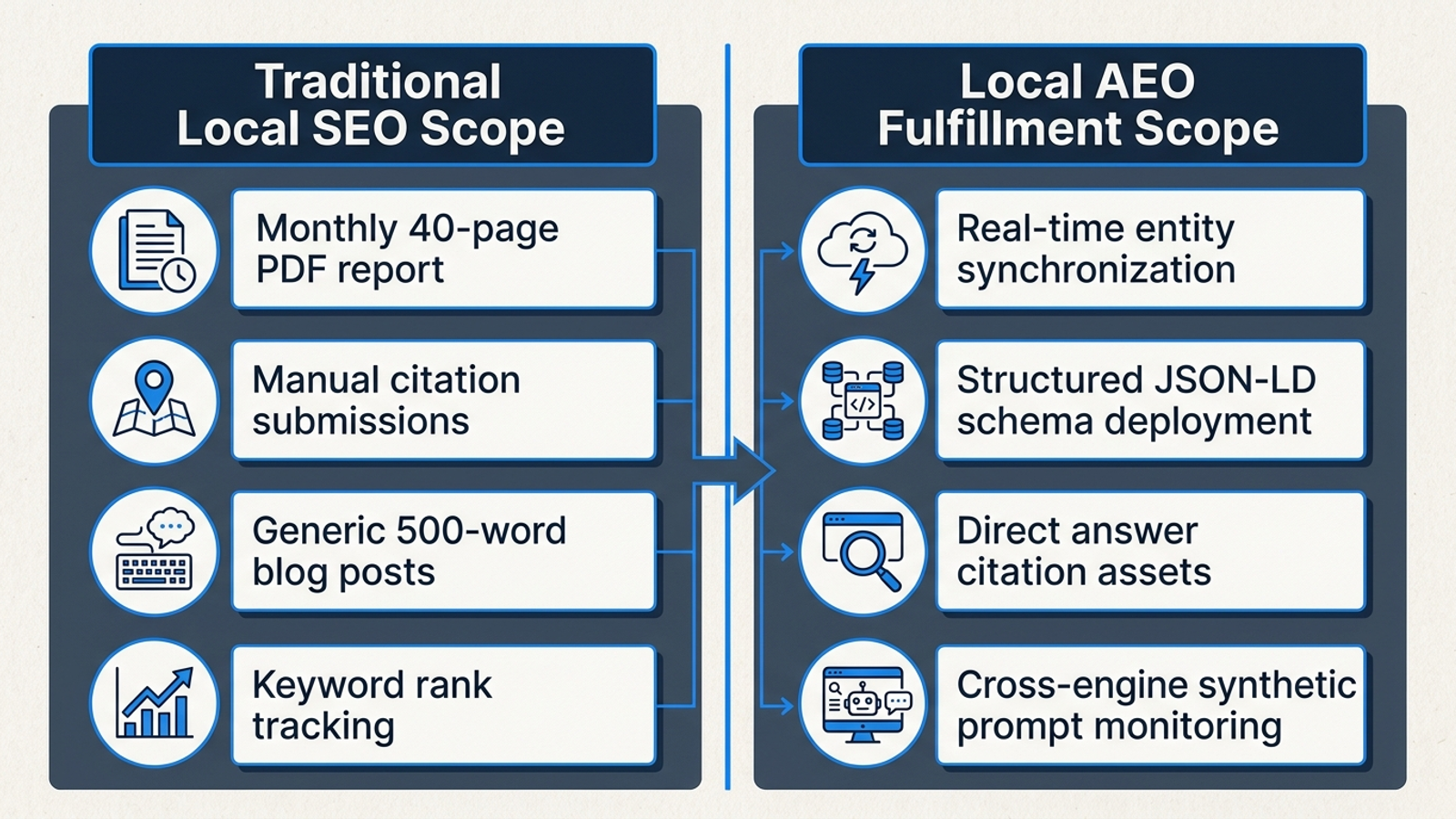
The one adjustment that matters: Name the profiles and pages you can actually access. “Directory submissions” sounds like a task you can finish by clicking a button; business information sync means checking whether the details buyers encounter agree. Local recommendations may draw on aggregators and review directories, so that work belongs in the table. But if a third-party developer controls the CMS, do not promise two published assets a month until you have a publishing route. The table is useful only when the client can verify it.
Swipe 2: Track buyer questions, not a pile of keywords
When to use it: Build the first prompt matrix during onboarding. Take the questions buyers ask on calls, then fill in the relevant set below. Monitor up to 20 agreed prompts per domain, not every synonym someone can invent. This is a tracking set, not a promise that an engine will name the client.
HOME SERVICES — use for plumbing, HVAC, roofing or electrical
1. Who offers emergency [SERVICE] in [CITY] with upfront pricing and 24/7 dispatch?
2. What does [SERVICE_TYPE_REPLACEMENT] cost in [METRO_AREA], and which licensed contractors list their pricing or estimate process?
3. Compare [SERVICE] companies near [NEIGHBORHOOD] on financing, labor warranties and emergency callout fees.
4. How does [CLIENT_NAME] compare with [COMPETITOR_NAME] for commercial [SERVICE] repairs in [COUNTY]?
5. Which contractors in [CITY] service [SPECIFIC_EQUIPMENT_BRAND], and what do they say about warranty coverage?

DENTAL AND SPECIALIZED HEALTHCARE
1. Which practices in [CITY] accept [INSURANCE_PROVIDER] and offer same-day appointments for [TREATMENT]?
2. What do practices in [METRO_AREA] say [PROCEDURE] costs out of pocket?
3. Find a pediatric clinic near [NEIGHBORHOOD] with sedation options, Saturday hours and bilingual staff.
4. Which [SPECIALTY_PRACTICE] clinics in [CITY] offer online booking and publish patient reviews?
5. Compare appointment availability and stated treatment options for [CLIENT_NAME] and [COMPETITOR_PRACTICE] in [ZIP_CODE].

MULTI-LOCATION AND REGIONAL SERVICE BRANDS
1. Find the closest [BRAND_SERVICE] branch to [MAJOR_INTERSECTION] with parking and weekend hours.
2. Which [SERVICE_TYPE] providers have facilities across [COUNTY]?
3. Compare published commercial service terms for [CLIENT_NAME] and regional competitors in [STATE_REGION].
4. Where can I book an in-person [SERVICE] consultation in [CITY_A] or [CITY_B]?
5. Which [INDUSTRY] companies near [REGION] offer centralized invoicing and dedicated account reps?
The one adjustment that matters: Keep prompts tied to a purchase decision. “How do I fix a leaking pipe?” tests whether an engine can give DIY advice, not whether it recommends a plumber in [CITY]. Broad prompts produce a tidy chart and a weak sales conversation. Per-prompt credit meters can also make monitoring across client domains an unpredictable software expense. Agree on the core set, record whether the client is named and note which sources the answer cites. Do not turn a new prompt variation into a new client deliverable.
Swipe 3: Send the monthly email a partner will forward
When to use it: Send this on the first business day of the month. Fill it from the change log and prompt matrix, not from last month’s email. Work shipped comes before citation movement because the client needs to see what the retainer bought even when an engine changes its answers.
Subject: [CLIENT_NAME] local and AI search update — [CURRENT_MONTH]

Hi [CLIENT_FIRST_NAME],

Here is the [CURRENT_MONTH] update for [CLIENT_DOMAIN].

1. What we shipped
- Business information: [PROFILES_CHECKED_AND_CHANGES_MADE]
- Structured data and service pages: [PAGES_UPDATED_AND_VALIDATION_STATUS]
- Answer assets: [LINK_ASSET_1] and [LINK_ASSET_2]

2. What we observed
We checked [PROMPT_COUNT] agreed buyer prompts across [ENGINES_CHECKED] on [CHECK_DATE].
- Client named: [CURRENT_COUNT] of [PROMPT_COUNT], versus [PREVIOUS_COUNT] last month.
- Sources cited: [RELEVANT_CLIENT_OR_THIRD_PARTY_SOURCES]
- Notable change: [OBSERVED_CHANGE_OR_NO_MATERIAL_CHANGE]

3. What needs attention
[VERIFIED_BOTTLENECK_AND_ACTION_TAKEN_OR_PLANNED]

4. Next month
- [PRIORITY_ASSET_OR_ENTITY_TASK_1]
- [PRIORITY_ASSET_OR_ENTITY_TASK_2]

Best,
[ACCOUNT_MANAGER_NAME]
[AGENCY_NAME]
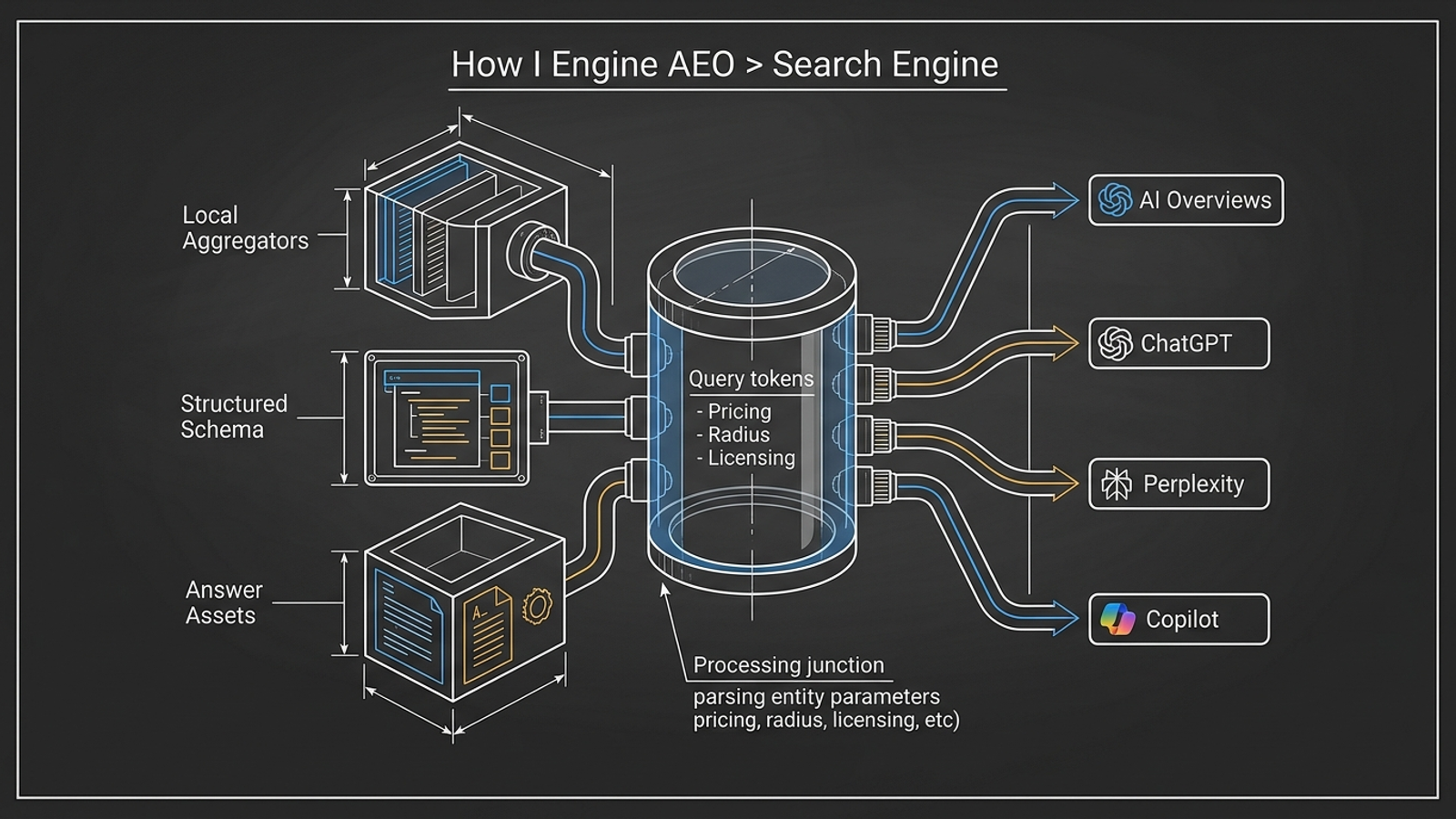
The one adjustment that matters: Never leave an impressive-sounding finding in the email unless you observed it. A template cannot know that Copilot used an outdated listing or that Perplexity cited a new page. Replace those fields with the dated observation, or say there was no material change. Local AI visibility can shift with directory coverage and prompt phrasing; the report should separate that movement from the work your team controls. A bare score invites “so what did you do?” This email answers it.
Swipe 4: Answer the two pricing objections without selling a dashboard
When to use it: Use these replies on sales calls and renewals when a prospect asks for per-prompt pricing or compares your retainer with monitoring software. The product is fulfillment; monitoring is the accountability log. I’ve made the same point about per-prompt AEO pricing: metering every query can punish the agency for checking more variations, while a prompt count alone says little about the work needed to improve the underlying business information.
PROSPECT: Why not charge per tracked prompt?

"Because the prompt is a measurement, not the work. Questions about emergency [SERVICE] in [CITY] may use different words, but they can depend on the same business hours, service information and directory records. Our flat retainer covers the work for [CLIENT_DOMAIN], plus monitoring of the agreed buyer-prompt set. We won't bill you for each wording change, and we won't pretend unlimited monitoring is included."

PROSPECT: Why pay a retainer when I can buy a monitoring tool?

"A tool can show you where [CLIENT_NAME] appears. It won't make the agreed business information corrections, publish the two answer assets or maintain the covered structured data for you. If you want a dashboard, buy a dashboard. This retainer is for doing the work and showing you what changed."
The one adjustment that matters: Do not pitch flat pricing as unlimited requests. Some AEO monitoring tools meter prompts and domains; escaping that meter is useful, but it does not make your writers’ or operators’ time infinite. Anchor the fee to the deliverables in Swipe 1 and the scope clause below. Our agency backend uses groas for agencies, with SEO and AI search execution at a flat $199 a month per client domain and 24/7 logging. That is an infrastructure price, not permission to promise custom work for free. If the buyer only wants query charts, these replies will not sell them an execution retainer. Let them buy the charts.
Swipe 5: Clear the five onboarding gates before work starts
When to use it: Give this to operations when a client signs. Aim to complete the gate within 72 hours; record anything blocked rather than marking it done. Access is a delivery dependency, not paperwork to chase after the first report is due.
LOCAL AEO ONBOARDING GATE — [CLIENT_NAME] / [CLIENT_DOMAIN]

[ ] 1. BUSINESS PROFILE ACCESS
    - Confirm appropriate Google Business Profile Manager access for [AGENCY_LOGIN].
    - Record primary category: [PRIMARY_CATEGORY].
    - Record storefront or service-area status and covered locations: [LOCATIONS].

[ ] 2. DIRECTORY AND BUSINESS INFORMATION AUDIT
    - Confirm access or correction route for agreed Yelp, Bing Places,
      Apple Maps and relevant industry profiles.
    - Flag legacy phone numbers, addresses and inconsistent hours: [ISSUES].

[ ] 3. CMS AND STRUCTURED DATA INVENTORY
    - Confirm publishing access or named publishing contact: [CMS_CONTACT].
    - Check covered pages for existing LocalBusiness, Service,
      Review and FAQPage JSON-LD: [PAGES_AND_FINDINGS].

[ ] 4. BUYER-PROMPT BASELINE
    - Agree on up to 20 transactional prompts: [PROMPT_MATRIX_LINK].
    - Record baseline observations for Google AI Overviews,
      ChatGPT Search, Perplexity and Copilot: [BASELINE_DATE_AND_LINK].

[ ] 5. CLAIMS AND PROFILE OWNERSHIP
    - Confirm who owns third-party profiles and handles review responses.
    - Verify business claims needed for assets, including applicable
      licensing, insurance, service boundaries and warranty terms: [OWNER].
The one adjustment that matters: Put a name beside every blocked login. Local-search onboarding can stall while teams wait for profile invitations and verification. If nobody can publish to the CMS, the answer-asset clock is already in trouble; if nobody can correct the business profiles, fixing on-page structured data alone will not resolve inconsistent listings. Do not call the gate complete because somebody has requested access.
Swipe 6: Put the margin-protecting clause in the contract
When to use it: Paste this into Schedule A when selling a new local SEO and AEO retainer or moving an account from white-label SEO to white-label AEO. Have it reviewed as part of your agreement before you send it for signature. One covered domain does not silently mean every location, every page and every task. That distinction is the whole point of the swipe file.
SCHEDULE A: LOCAL SEO AND ANSWER ENGINE OPTIMIZATION SERVICES

Client: [CLIENT_NAME]
Covered domain: [CLIENT_DOMAIN]
Covered location(s): [COVERED_LOCATIONS]
Primary geographic area: [PRIMARY_METRO] ([RADIUS_MILES]-mile radius)
Effective date: [EFFECTIVE_DATE]
Monthly retainer: $[MONTHLY_RETAINER] per month, billed on the 1st

1. RECURRING IN-SCOPE WORK
For the covered domain and location(s), Agency will provide:

- Monthly audit and correction of agreed business name, address,
  phone number, hours and categories on accessible primary profiles
  and relevant directories.
- Monthly maintenance and validation of applicable LocalBusiness,
  Service, Review and FAQPage JSON-LD on covered pages.
- Two local service answer assets per calendar month, up to 1,200
  words each. Client will provide consolidated factual corrections
  within 48 hours of receipt; delayed feedback moves the publication
  timeline. Agency will not publish unapproved factual claims.
- On-page entity updates to up to five existing core service URLs
  per quarter.
- Monthly checks of up to 20 agreed high-intent buyer prompts
  across Google AI Overviews, ChatGPT Search, Perplexity and Copilot,
  with a summary of observed brand presence and cited sources.

2. EXPRESS EXCLUSIONS
The retainer excludes website redesigns, CMS migrations, custom
page builds, review mediation, phone answering, disputes with
third-party platforms and paid advertising management unless added
in a separate schedule. Additional domains or locations require
written scope and pricing before work begins.

Search engines and generative systems control their own results.
Agency does not guarantee placement, rank, persistent citations
or inclusion in any specific generated answer.

3. CHANGE ORDERS
Work outside Section 1 requires approval before it begins.
A task estimated at under two hours may be approved by Client
by email and billed at $[HOURLY_RATE] per hour. A task estimated
at two hours or more requires a signed mini statement of work
stating the work, delivery dates and flat project fee.
The one adjustment that matters: Set [COVERED_LOCATIONS] before you set the price. A three-branch client can have one domain and three sets of local profiles; “per domain” alone will not tell either side which branches you are maintaining. The same goes for approvals: give the client a route to correct factual pricing, licensing or service claims without letting a five-day editorial loop consume two monthly assets. If they need layered creative review, price that work separately.
This is the artefact I would copy first. The prompt set helps you measure; the report helps you explain. The scope clause decides whether either task stays profitable when the next request arrives.